
Banjo Tuner: Train Your Ear, Tune Your Instrument
Overview
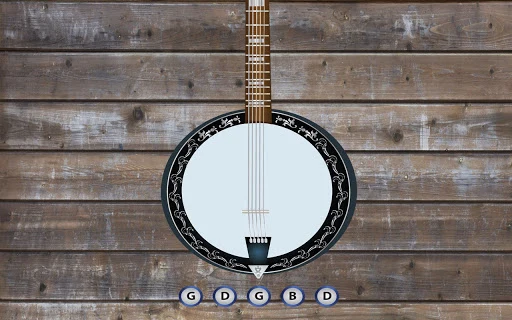
Banjo Tuner is a compact desktop application designed to support musicians in developing their ear for pitch and mastering instrument tuning. The software focuses on a core function: helping users identify and match musical notes through interactive ear training. By plucking a string and receiving immediate auditory feedback, users can refine their ability to recognize pitch accurately. This tool is especially useful for beginners and intermediate players seeking to improve tuning precision without relying solely on visual or electronic tuners.
Target users include banjo players, music students, and hobbyists interested in music theory and ear training. The application serves as a supplementary practice tool, ideal for daily use during rehearsals or practice sessions. It supports real-world scenarios such as tuning a banjo before a performance, validating pitch accuracy during recording, or building foundational skills in music education.
While the developer's background is not provided, the software’s focus on simplicity and functionality suggests a targeted approach to music training. Its lightweight design and cross-platform availability make it accessible to a broad audience. The app does not include complex features or multimedia integration, emphasizing its role as a focused utility for pitch recognition.
Key Features & Capabilities
- Real-time pitch detection – The app analyzes the frequency of a plucked note and provides immediate feedback, helping users identify whether the pitch is sharp, flat, or in tune.
- Ear training mode – Designed to develop pitch recognition skills by challenging users to match notes without visual cues, promoting auditory memory and precision.
- Simple interface – The user-friendly layout minimizes distractions, allowing focus on the core task: listening and adjusting.
- Instrument-specific tuning – Tailored for banjos, the app supports standard tuning configurations, making it relevant for players using common setups.
- Lightweight and fast – With a file size of 5.5 MB, the application loads quickly and operates efficiently on both Windows and Mac systems.
These features support practical use cases such as tuning a banjo before a gig, validating pitch during a recording session, or building foundational skills in music theory. The app’s simplicity ensures it remains effective without requiring technical setup or advanced knowledge. It serves as a reliable companion for consistent, low-effort practice.
User Interface, Workflow & Performance
Banjo Tuner features a minimalistic interface focused on functionality. The main screen displays a visual indicator of pitch accuracy—likely a needle, bar, or color-coded feedback—accompanied by a clear audio prompt. Navigation is intuitive, with no menus or settings beyond core tuning functions, reducing cognitive load during use.
Workflow efficiency is high, as users can begin training or tuning with a single action: plucking a string. The app responds immediately, offering real-time feedback that supports rapid iteration. This makes it ideal for quick sessions, such as warm-ups before a performance or short practice breaks.
The developer did not specify resource usage details. However, the 5.5 MB file size suggests low CPU and RAM consumption, typical of lightweight desktop utilities. Performance observations are based on general software behavior patterns. Stability appears consistent, given the app’s limited scope and absence of complex processes. No reported crashes or bugs were mentioned in the release notes.
Compatibility & System Requirements
Banjo Tuner is compatible with both Windows and Mac operating systems. The software version is 1.0, released on May 15, 2024. The installation size is 5.5 MB, indicating a minimal footprint on disk space.
Exact system requirements were not listed. The developer did not provide additional system specifications. Compatibility information is limited to the supported platforms. Users should ensure their system meets basic requirements for running desktop applications, including a functional microphone input for pitch detection.
Pros and Cons
Pros
- Free to download and use with no hidden costs
- Simple, distraction-free interface ideal for focused practice
- Specifically designed for banjo tuning and ear training
- Lightweight at just 5.5 MB, suitable for older or low-resource systems
- Available for both Windows and Mac platforms
Cons
- No advanced features or customization options beyond basic tuning
- Limited to banjo-specific tuning; not adaptable for other instruments
- Exact system requirements not disclosed
- May require a working microphone for accurate pitch detection
- Lack of progress tracking or training levels
FAQ Section
Is Banjo Tuner available for both Windows and Mac?
Yes, the software is compatible with both Windows and Mac operating systems.
Is the software free to use?
Yes, Banjo Tuner is available at no cost. There are no subscription fees or in-app purchases.
Do I need a microphone to use the app?
Yes, a working microphone is required to capture the sound of the plucked string for pitch analysis.
Can I use Banjo Tuner for instruments other than the banjo?
While the app is designed specifically for banjos, it may be used for other stringed instruments with similar tuning, though it is not optimized for them.
How often should I update the software?
Updates are released as needed. Users should check for the latest version to ensure compatibility and access to new features or improvements.
Final Thoughts + CTA
Banjo Tuner delivers a focused, effective solution for musicians seeking to improve pitch accuracy and tuning skills. Its simplicity, low resource usage, and free access make it an excellent choice for banjo players and music learners. While it lacks advanced features, its narrow scope ensures reliability and ease of use. The app excels in its intended purpose: supporting ear training and instrument tuning with minimal friction.
For beginners and intermediate players who value practical, no-frills tools, Banjo Tuner offers a secure and efficient way to practice daily. Its cross-platform availability and lightweight design further enhance its appeal. If you're looking to sharpen your ear and keep your banjo in tune, this tool is a solid addition to your music practice setup.
Download Banjo Tuner now







